How to Download Any Instagram Video Without Any App (2026)
Download Instagram videos — regular posts, Reels, IGTVs — without installing anything. 100% browser-based, free.
Building free video-download tools since 2024. Expert in web APIs, extractors, and multimedia processing across all major platforms.
Download Free HD Videos & Media
TikTok · Instagram Reels · Facebook · Twitter/X · 100% Free · No Watermark
Instagram hosts three types of video content — regular video posts, Reels, and longer IGTV-style videos. All three can be downloaded in HD without installing any app, creating any account, or granting any permissions. Here's exactly how to do it in 2026 on any device.
Types of Instagram Videos You Can Download
- Reels — Short vertical videos up to 90 seconds, Instagram's most-viewed format
- Feed Videos — Regular video posts in square, portrait, or landscape format
- IGTV / Long Videos — Videos longer than 60 seconds, now integrated into the main feed
- Story Videos — 15-second vertical clips (only downloadable before they expire in 24 hours)
- Carousel Posts with Video — Multi-item posts that contain a mix of images and videos
How to Get an Instagram Video URL
Before downloading, you need the video's URL. Here's how to get it on each device:
On Mobile (iPhone or Android)
- Open the Instagram app
- Find the video post or Reel
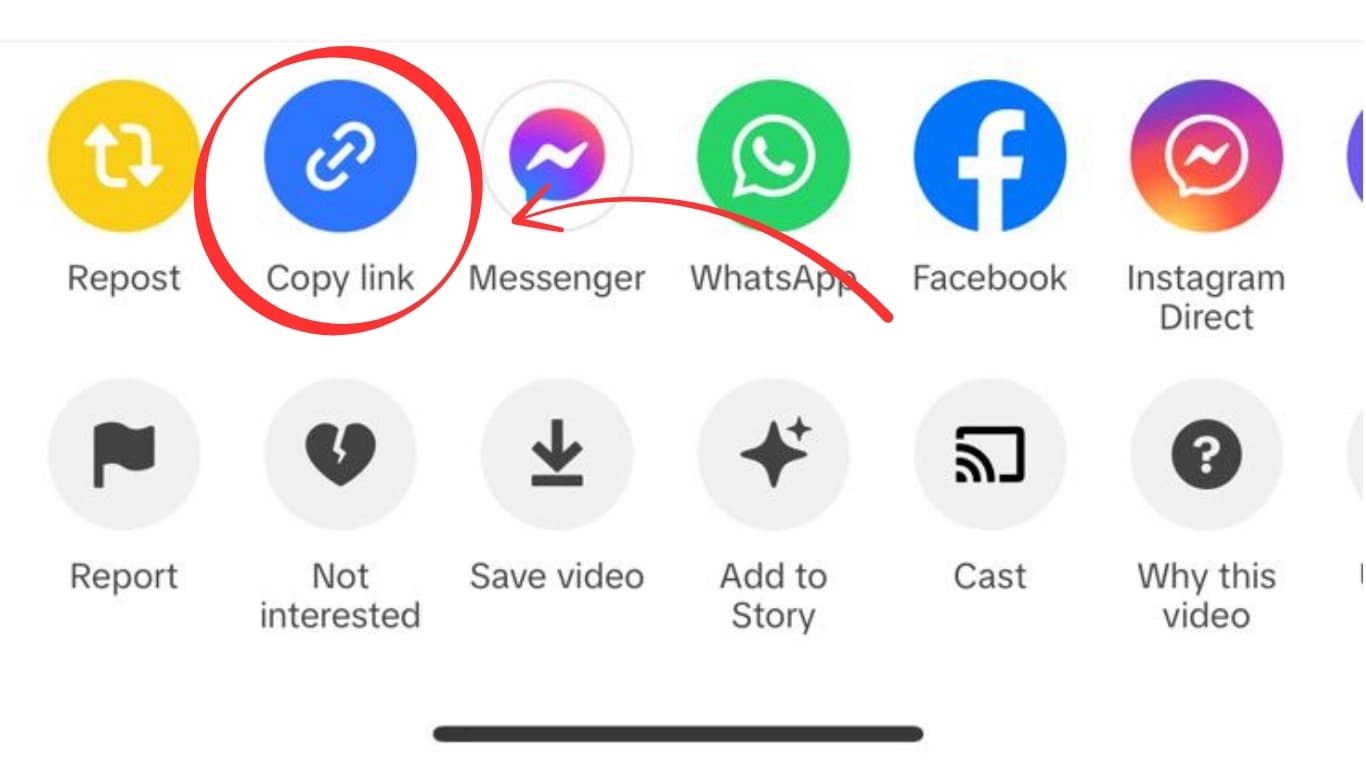
- Tap the three-dot menu (...) or the paper airplane Share icon
- Tap Copy Link
- The link is now in your clipboard
On Desktop (PC or Mac)
- Go to instagram.com in your browser
- Open the video or Reel
- Copy the URL directly from the browser's address bar — it looks like
https://www.instagram.com/p/XXXXXXXXXX/orhttps://www.instagram.com/reel/XXXXXXXXXX/
Step-by-Step: Download Instagram Video on iPhone (No App)
- Copy the Instagram video URL using the steps above
- Open Safari on your iPhone (not Chrome for best results)
- Go to an Instagram video downloader
- Tap the input box, paste the Instagram URL, tap Download
- Safari shows a download progress indicator in the toolbar (iOS 13+)
- When complete, tap the download icon (downward arrow in toolbar)
- Tap the video file to preview it
- Tap Share → Save Video to move it to your Camera Roll
Step-by-Step: Download Instagram Video on Android
- Copy the Instagram video link in the Instagram app (⋯ → Copy Link)
- Open Chrome on your Android device
- Navigate to an Instagram video downloader
- Paste the link into the input box and tap Download
- Tap Download Video
- Chrome saves the MP4 to your Downloads folder automatically
- Open the Files app or your Gallery to find and play the video
Step-by-Step: Download Instagram Video on PC or Mac
- Go to instagram.com and open the video post
- Copy the URL from your browser's address bar
- Open an Instagram video downloader in a new tab
- Paste the URL and click Download
- Click Download Video — the MP4 saves to your Downloads folder
PC downloads are the simplest — the browser handles everything in one click with no additional steps.
Video Quality: What to Expect
Instagram stores videos at up to 1080p Full HD for Reels. Feed videos and IGTV may vary based on the original upload. Here is what influences the download quality:
| Content Type | Max Quality | Typical Size |
|---|---|---|
| Instagram Reels | 1080p (1920×1080) | 10–80 MB |
| Feed Videos | 720p–1080p | 5–50 MB |
| IGTV / Long Videos | 720p–1080p | 20–300 MB |
| Stories | 720p | 2–15 MB |
You download exactly what Instagram stores — no additional compression happens during the download process.
Why Not Just Screen Record?
Screen recording is a common fallback but has real drawbacks compared to a direct download:
- Lower quality — screen recording captures the compressed stream, not the stored file; typical result is 720p or lower
- UI clutter — your status bar, notifications, and other UI elements may appear in the recording
- Larger file size — screen recordings are not efficiently encoded; they can be 2–3x larger than the original file
- Audio sync issues — some devices have a slight delay between the screen content and the audio recording
- Privacy risk — you may accidentally capture notifications containing personal information
A direct download gives you the clean original file at the correct quality in a properly encoded MP4.
Instagram Stories: Special Considerations
Instagram Stories are more challenging to download for two reasons:
- They expire after 24 hours — you must download within this window
- Instagram hides the direct URL — Stories do not have a public permalink in the same way that Posts and Reels do
Some downloaders handle Stories if the account is public. The URL format for Stories is different: you must be on the Stories viewing page and copy the URL from your browser's address bar (works on desktop). On mobile, the process is trickier and screen recording may be the most reliable option for Stories.
Can I Download Videos from Private Instagram Accounts?
No — if you cannot view the video in your browser without being logged in and approved as a follower, no downloader can access it either. Downloader tools fetch publicly accessible files from Instagram's servers. Private account content requires authentication that third-party tools do not have.
If you follow a private account and want to save their video, screen recording is the only practical option.
Does Instagram Know When You Download a Video?
No. Instagram has no mechanism to detect third-party downloads. The process is entirely private from Instagram's perspective — the request to their servers looks identical to a standard streaming request. The creator receives no notification and Instagram does not log it as a download event.
Will Instagram Ban My Account for Downloading?
No. Downloading someone else's public video through a browser-based tool has no interaction with your Instagram account. You don't need to be logged in to a downloader, and the downloader does not interact with your Instagram session.
Frequently Asked Questions
Does Instagram watermark videos when downloaded this way?
No. Unlike TikTok, Instagram does not add its branding or the creator's username to videos downloaded through third-party tools. The file is the original, clean MP4.
What if the download link doesn't work?
Try copying the link again from the Instagram app. Sometimes shared links include tracking parameters that cause issues. The cleanest link comes from instagram.com in a desktop browser address bar.
Can I download Instagram Reels from the Explore page?
Yes. Any public Reel you can view — whether from your feed, profile grid, or Explore — can be downloaded. The URL structure is the same regardless of how you discovered the Reel.
What format does the downloaded video use?
MP4 — the most universally compatible format. It plays on every device, video player, and editing app without conversion.
Related Guides
Photo by Zhivko Minkov on Unsplash
Download Videos, Reels & Audio Without Watermark
Paste any link into our free browser tools. Fast HD MP4 downloads, 320kbps MP3 audio extraction, and full-resolution photo carousels.