How to Download Trending TikTok Sounds & Music Clips (2026)
Grab trending TikTok audio clips and sounds as MP3 files in 2026. Perfect for ringtones, remixes, and content creation.
Building free video-download tools since 2024. Expert in web APIs, extractors, and multimedia processing across all major platforms.
Download Free HD Videos & Media
TikTok · Instagram Reels · Facebook · Twitter/X · 100% Free · No Watermark
Trending TikTok sounds are the heartbeat of viral content. From catchy audio clips to full song remixes, knowing how to save them as MP3 files opens up tons of creative possibilities. Here's the complete guide for 2026.
What Are TikTok Sounds?
Every TikTok video uses a sound — it could be:
- An original sound the creator recorded
- A licensed song from the TikTok music library
- A viral audio clip (meme sounds, dialogue snippets, remixes)
- Voiceover or duet audio
Trending sounds spread virally — one clip can spawn millions of videos. Saving them for your own use, ringtones, or content creation is very common.
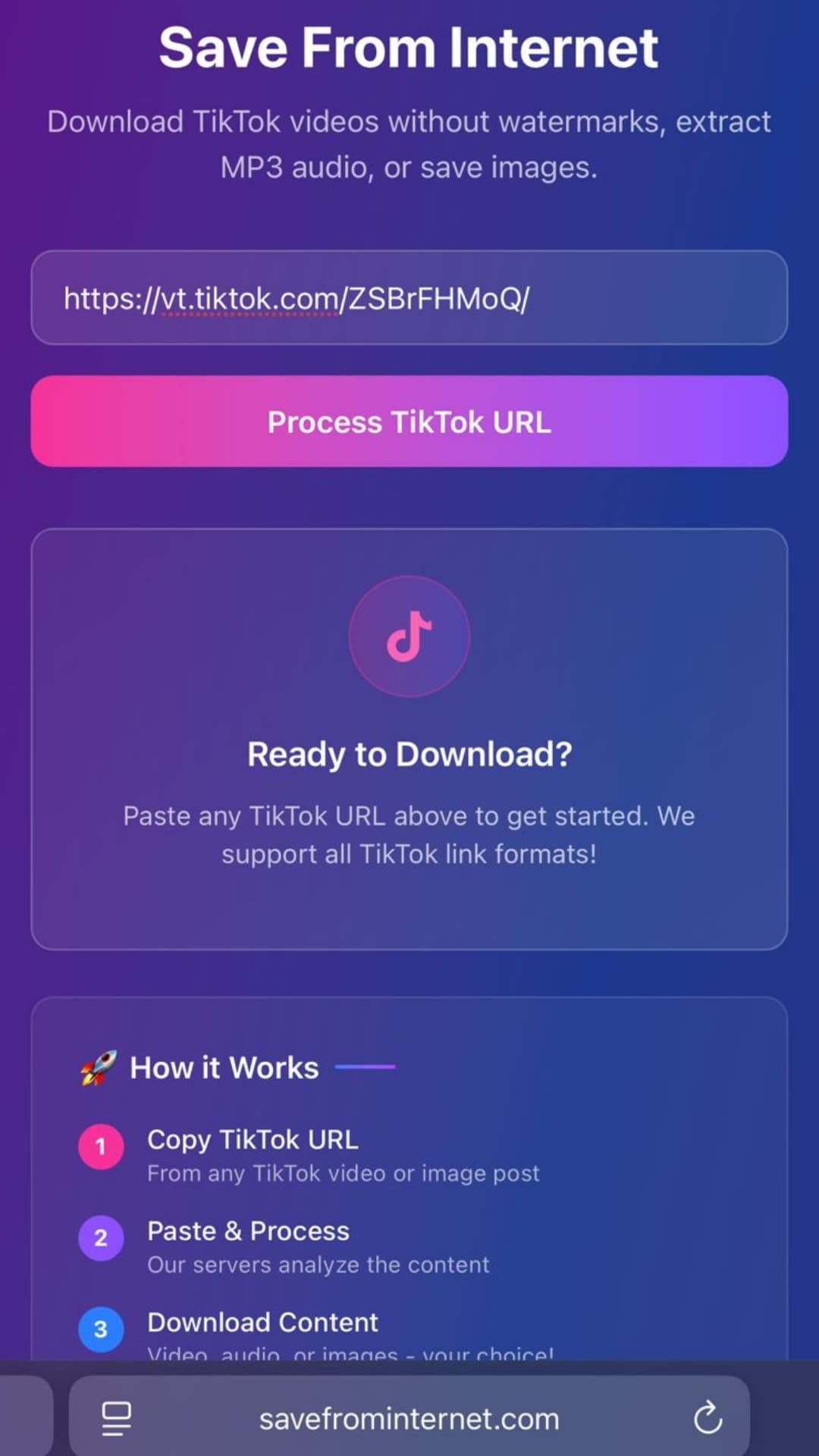
How to Download a TikTok Sound as MP3
- Find a TikTok video using the sound you want
- Tap the Share button → Copy Link
- Open savefrominternet.com
- Paste the TikTok video URL
- Click Download
- Select Extract Audio (MP3)
- The audio saves as an MP3 file to your device
How to Find Trending TikTok Sounds
To find what's currently trending:
- TikTok Creative Center (ads.tiktok.com/creative-center/trend-calendar) — official trending music data
- TikTok Discover page — sounds are listed in trending videos
- Tap any sound on a video → you'll see how many videos use it
- Search by artist or song title in TikTok search
Popular Uses for Downloaded TikTok Sounds
- Ringtones: Set your favorite TikTok sound as an iPhone or Android ringtone
- Content creation: Use the audio as background music in your own videos
- Remixes: Remix or sample trending sounds in music production software
- DJing: Drop a viral TikTok sound into a live set
- Study/focus playlists: If the sound is relaxing or ambient
Audio Quality of TikTok Sounds
TikTok encodes audio at 128 kbps AAC (equivalent to ~128 kbps MP3). For viral clips and meme sounds, this quality is more than sufficient. For music tracks, the original Spotify/Apple Music quality is higher — use official streaming platforms if you need premium audio quality.
Frequently Asked Questions
Can I use downloaded TikTok sounds commercially?
Most popular songs on TikTok are licensed — using them commercially outside TikTok requires separate licensing. Original sounds may be usable depending on the creator's permissions.
How do I convert the downloaded MP3 to a ringtone?
On iPhone: use GarageBand to trim and export as an M4R ringtone. On Android: copy the MP3 to your Ringtones folder and select it in sound settings.
Can I download the full song if it's only a clip on TikTok?
TikTok only stores the clip portion used in the video — typically 15–60 seconds. For the full song, use Spotify, Apple Music, or Twitter/X Music.
Related Guides
Photo by Vitaly Gariev on Unsplash
Download Videos, Reels & Audio Without Watermark
Paste any link into our free browser tools. Fast HD MP4 downloads, 320kbps MP3 audio extraction, and full-resolution photo carousels.